
How to Use AI to Pre-Qualify Leads Before You Get on a Sales Call
Unqualified discovery calls are one of the most expensive hidden costs in running an AI agency. A 45-minute call with someone who has no budget, no decision-making authority, or no clear problem is 45 minutes you could have spent on a qualified prospect. At scale, this cost compounds. An AI-powered lead qualification system eliminates 50 to 70 percent of unproductive sales calls by filtering and scoring prospects before they reach your calendar — leaving only the leads who match your ideal client criteria.
What Pre-Qualification Actually Solves
Pre-qualification is not gatekeeping. It is alignment. When you qualify a lead before a call, both parties arrive better prepared — the prospect has articulated their problem in concrete terms, and you know enough about their situation to make the call genuinely useful rather than exploratory from scratch. The data shows that pre-qualified discovery calls close at two to three times the rate of unqualified calls, even when the underlying prospect quality is similar. Articulating a problem before a call creates a commitment to solving it.
Impact of AI Pre-Qualification on Sales Metrics
The BANT Qualification Framework
The classic BANT framework — Budget, Authority, Need, Timeline — remains the most reliable pre-qualification structure for B2B services. For AI automation specifically, translate each dimension into questions a prospect can answer in under three minutes. Budget: "What are you currently spending on [the problem area] — either in direct costs or staff time?" Authority: "Are you the person who would make the final decision on this, or would others need to be involved?" Need: "What specific problem are you trying to solve, and how long has it been an issue?" Timeline: "When are you looking to have something like this in place?"
Add two AI-agency-specific questions: "How many leads do you receive per month, and what is your average deal value?" This produces the ROI calculation you will need for the call. And: "What tools are you currently using for [CRM, lead capture, communications]?" This tells you immediately whether the integrations you build are compatible with their existing stack.
Building the AI Qualification Flow in n8n
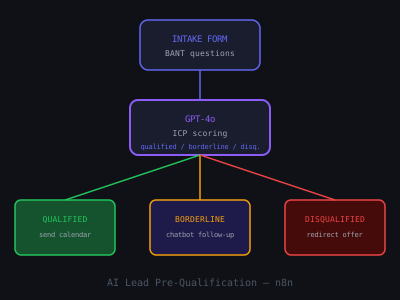
The qualification flow has three components. First, the intake form — add six to eight qualification questions to your booking page or as a pre-booking requirement. Use Typeform or a native Calendly intake form. The form is not optional: make completing it a prerequisite for booking access to your calendar. This filters out tire-kickers who will not complete a three-minute form. Second, the AI scoring workflow — when a form is submitted, the data triggers an n8n workflow that sends the responses to GPT-4o with a scoring prompt. The prompt asks GPT to score the lead on each BANT dimension from 1 to 5 and calculate a total score out of 20. Leads scoring 14 or above get routed to your calendar. Leads scoring below 14 get routed to a nurture sequence. Third, the routing decision — qualified leads receive a confirmation with the booking link. Lower-scoring leads receive a response that offers a free resource, asks for more context, or offers a group call instead of a 1:1. None are rejected outright — they are triaged appropriately.
The AI Scoring Prompt
The scoring prompt to pass to GPT-4o after form submission: "Evaluate this lead for an AI automation agency that serves small and mid-sized service businesses. Score each BANT dimension from 1 to 5 based on the responses below. Budget (5=clear budget or clear cost problem, 1=vague or no budget signal). Authority (5=sole decision-maker, 1=not the decision-maker). Need (5=specific urgent problem, 1=vague curiosity). Timeline (3 months or sooner = 5, 12 months or more = 1). Fit (score 5 if they have high lead volume and high deal value, 1 if lead volume or deal value is very low). Calculate total out of 25. Provide one sentence of rationale. Responses: [form data]." Output the score and rationale as JSON for clean downstream processing in the n8n workflow.
What to Do With Lower-Scoring Leads
Do not discard leads who score below the threshold. Lower-scoring leads fall into two categories: not ready yet (they have the problem but not the budget or timeline urgency) and not the right fit (wrong company size, decision-making authority, or problem type). For not-ready leads, add them to a quarterly check-in sequence — a brief email every 60 days that shares one relevant case study or insight. Timing-based no decisions often convert six to twelve months later when the timing changes. For not-right-fit leads, consider whether a referral to a more appropriate provider would be useful. Referrals build goodwill even with prospects you cannot serve. For the broader system that makes qualification work, see how to create an AI CRM workflow and 5-minute lead response automation.
Pre-Qualification Intake Form Questions
1. What is your main business type and industry?
2. How many leads do you receive per month?
3. What is your average deal or project value?
4. What is the biggest lead or sales problem you are trying to solve?
5. Are you the decision-maker for tools and services like this?
6. When are you hoping to have a solution in place?
Join 215+ AI Agency Owners
Get free access to our all-in-one outreach platform, AI content templates, and a community of builders landing clients in days.