
How to Build a Customer Onboarding Automation From Scratch Using n8n
A poor onboarding experience is one of the top reasons clients churn in the first 90 days. Yet most small and mid-sized businesses still onboard new customers manually — sending ad-hoc emails, forgetting follow-ups, and losing track of what documents have been collected. AI automation fixes this entirely.
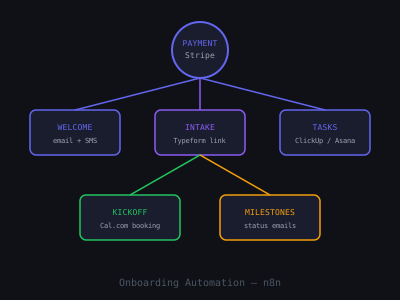
In this guide you'll build a complete, production-ready customer onboarding automation from scratch using n8n. By the end, new customers will be greeted instantly, guided through a structured intake process, and tracked through each milestone — all without anyone on your client's team lifting a finger.
What a Complete Onboarding Automation Covers
The system you'll build handles these stages automatically:
- Trigger — new customer added to CRM or payment confirmed in Stripe
- Welcome sequence — personalized email + SMS sent within 2 minutes
- Intake form — automated link delivery to collect required information
- Document requests — reminders sent if documents not submitted within 48 hours
- Internal task creation — team notified and tasks assigned in project management tool
- Status updates — client receives milestone confirmation emails throughout
- Kickoff scheduling — calendar booking link sent after intake is complete
Before building, map out your client's existing onboarding manually. Interview whoever currently handles it and ask: what information do you collect, in what order, and what breaks most often? That conversation will reveal the exact nodes you need and where the Wait + IF logic should live. Most businesses have 6–10 manual steps they've never written down. Your job is to encode all of them into the workflow.
Step 1: Choose Your Trigger
In n8n, add a trigger node that fires when a new customer is created. The best options depend on your client's stack:
- Stripe Trigger — fires on "payment_intent.succeeded" or "checkout.session.completed"
- HubSpot Trigger — fires when deal stage moves to "Closed Won"
- Typeform / Tally Trigger — fires when a sign-up form is completed
- Webhook — universal trigger from any source
For most service businesses, the Stripe trigger is cleanest — it fires the moment payment is confirmed, which is exactly when onboarding should begin. Extract the customer's name, email, and product/plan from the Stripe event payload.
If your client uses HubSpot, set the trigger to fire on the "Deal Stage Changed" event filtered to "Closed Won." In the HubSpot node settings, enable "Return Associated Contact" so the workflow immediately has the contact's email, first name, and any custom properties you've set — no secondary lookup required. For clients not on HubSpot or Stripe, a bare Webhook node works with any system that can send an HTTP POST. Practically every CRM, form tool, and payment platform supports outbound webhooks.
Add a Set node immediately after the trigger to normalize the data into consistent variable names (customerEmail, customerFirstName, planName, triggeredAt). This matters because if you later swap the trigger (say from Stripe to HubSpot), you only need to update the Set node rather than hunting down expression references throughout the whole workflow.
Step 2: Send the Welcome Email
Add a Gmail or SendGrid node immediately after the trigger. Send a warm, personalized welcome email that:
- Addresses the customer by first name
- Confirms what they purchased
- Sets expectations for the next 48–72 hours
- Includes a link to the intake form (generated dynamically)
- Provides a direct contact email or phone number for questions
Use n8n's Expression editor to pull the customer's first name from the trigger payload and inject it into the email body. Keep the tone human — avoid anything that feels like a template.
Here is what a high-converting welcome email actually looks like for a marketing agency context:
Subject: Welcome aboard, [First Name] — here's what happens next
Hey [First Name], your payment just came through and we're already getting started. Over the next 48 hours, here's what you'll see from us: (1) a short intake form so we can understand your business before the kickoff call, (2) an intro from your account manager, and (3) a link to book your kickoff call. The intake form takes about 8 minutes. Fill it out when you have a moment — the sooner you do, the faster we move. Any questions before then, just reply to this email.
Notice what's in that email: a numbered sequence of what happens next, a time estimate for the form, and a reply-to option. Each of those details reduces anxiety and increases completion rate. Run the subject line through your sending tool's preview — make sure "[First Name]" is resolving correctly before you go live.
In the SendGrid node, set the "From Name" to the account manager's actual name rather than the company name. Emails from "Sarah at Apex Marketing" get opened at significantly higher rates than emails from "Apex Marketing."
Step 3: Create the Intake Form and Link It to the Client Record
Build a Typeform or Tally form that collects all required onboarding information. For a marketing agency client, this might include: business goals, target audience, brand assets, existing accounts to connect, and preferred communication style. For a legal firm, it would include matter details, relevant documents, and conflict-of-interest questions.
Use a Notion Database node or Airtable node to create a new record for this customer and embed the record ID in the form URL as a hidden field. This links form submissions back to the client record automatically without any manual matching.
In Tally, hidden fields are passed as URL parameters: https://tally.so/r/FORMID?clientId={{recordId}}. In Typeform, use the "Hidden Fields" feature and pass them as query params the same way. When the form is submitted, the webhook payload includes the hidden field value, so your n8n workflow can immediately look up the correct Airtable or Notion record and update it — no fuzzy name matching needed.
Keep intake forms short. Eight questions or fewer is the target. Every additional required field drops your completion rate. If you need 20 pieces of information, split them across two forms: a short one at onboarding and a fuller one sent 24 hours after the kickoff call when the relationship is warmer.
Step 4: Document Request and Reminder Automation
After sending the intake form link, add a Wait node set to 48 hours. After the wait, add an IF node that checks whether the intake form has been submitted (by querying Airtable or Notion for the record status).
- If submitted → continue to internal task creation step
- If not submitted → send a friendly reminder email + SMS
Add a second Wait node for another 24 hours and repeat the check. After a second missed deadline, trigger a Slack notification to the account manager so they can personally reach out. This three-touch approach catches the vast majority of delayed responses without being annoying.
The reminder email should be brief and non-judgmental. Something like: "Hey [First Name], just a quick nudge — we're holding your spot but need your intake form before we can move forward. It only takes 8 minutes: [link]. Let me know if anything is unclear." Short, warm, and action-oriented. Avoid corporate language like "as per our previous email."
For document-heavy industries (legal, accounting, mortgage), add a parallel branch for document collection. Send a Google Drive upload link or a Dropbox file request link in the welcome email. In n8n, use the Google Drive Trigger node set to watch a specific folder for new uploads. When a file appears, update the Airtable record to mark that document as received and check whether all required documents are now present using an IF node. If everything is collected, fire the next stage. If documents are still missing after 72 hours, send a targeted reminder listing only the specific missing items by name.
Step 5: Internal Task Creation
Once intake is complete, create tasks automatically in your client's project management tool. n8n has native integrations with Asana, ClickUp, Monday.com, Trello, and Notion.
For a standard service business, create these tasks automatically:
- Account setup — assigned to operations, due in 2 days
- Kickoff call scheduled — assigned to account manager, due in 3 days
- Initial deliverable / strategy — assigned to service team, due in 7 days
- First check-in email — assigned to account manager, due in 14 days
Also send a Slack message to the relevant channel with a summary of the new client, their intake responses, and links to their records. This replaces the manual "heads up" email that team leads usually send.
In ClickUp, use the "Create Task" node and set the due_date field using an expression like{{ $now.plus(2, 'days').toMillis() }}. You can also set custom fields — for example, a "Client Name" field so the task displays the client's company name without opening the description. If your client uses ClickUp's "Spaces" structure, create a dedicated folder for each client automatically by using the "Create Folder" node before creating tasks, then nesting all tasks inside it.
The Slack notification should include a structured summary block rather than a wall of text. Use Slack's Block Kit format in the n8n Slack node: a header with the client name, a section listing their plan and payment amount, key intake answers (goals, timeline, any flags), and a button linking to their Airtable/Notion record. Team members can click straight into the record without hunting for it.
Step 6: Kickoff Call Scheduling
Add a Cal.com node or send a Calendly link via email once the intake form is complete. Use an HTTP Request node to hit the Cal.com API and create a dedicated booking event for this client with their details pre-filled. Send the booking link via email and SMS simultaneously using a Twilio node.
Include a 24-hour reminder and a 1-hour reminder before the kickoff call, triggered by separate scheduled n8n workflows that check upcoming bookings each hour.
The kickoff scheduling email should do two things: give the booking link and tell the client what to prepare. A short bullet list — "bring your login credentials for X, a rough sense of your budget for Q3, and any questions from the intake form" — means the kickoff call is productive from minute one. Clients who show up prepared have better first experiences and are more likely to become long-term retainer clients.
For the reminders, use a Schedule Trigger node set to run every hour. The workflow queries Cal.com for bookings happening in the next 24 hours and the next 1 hour, cross-references which ones have already been notified (using a boolean flag in Airtable), sends the reminder, then marks the flag as true. This prevents duplicate reminders without needing a complex deduplication system.
Step 7: Milestone Status Updates
Clients love knowing where they stand without having to ask. Build a milestone notification system that emails the client at each key stage:
- Intake received — "We've got your information, here's what happens next"
- Team assigned — "Meet your account team"
- Kickoff confirmed — "Your kickoff is booked for [date/time]"
- Work in progress — "We're working on your first deliverable"
- 30-day check-in — "How's everything going so far?"
These touchpoints dramatically reduce inbound support requests and churn in the first 90 days — a metric your clients will notice immediately.
Each milestone email should follow a consistent three-part structure: (1) what just happened, (2) what happens next and when, (3) who to contact if they have questions. Keep each email under 120 words. Clients don't read long status updates — they scan them. Short and specific performs better than thorough and vague.
Track all milestone emails in a dedicated Airtable table with columns: ClientID, MilestoneName, SentAt, Opened (boolean), Replied (boolean). Populate this table from n8n each time an email sends. After 30 days, you can show your client a visual dashboard of how every new customer moved through onboarding — which is a powerful retention argument when renewal comes up.
Step 8: Error Handling and Edge Cases
Production onboarding workflows break in predictable ways. Build these safeguards in from the start:
- Duplicate trigger protection: Stripe sometimes fires the same event twice. Add an IF node after the trigger that checks whether a record with this customer's email already exists in Airtable before creating a new one. If a duplicate is found, route to a Slack alert rather than re-running onboarding.
- Missing email address: If the trigger payload has no email (rare but possible with some CRM setups), route to an error branch that sends a Slack alert with the raw payload for manual review.
- SendGrid / Gmail rate limits: If you're onboarding more than 100 new customers per day, use SendGrid with a verified domain rather than Gmail. Gmail caps at 500 sends per day for Workspace accounts.
- Intake form not receiving webhook: Add a fallback: a scheduled workflow that runs every 4 hours and checks Airtable for records where intake_submitted is null and created_at is more than 4 hours ago. These are customers whose form was sent but whose webhook may have failed. Re-trigger the form send for these records.
- Task creation failure: Wrap the ClickUp/Asana task creation in a Try-Catch using n8n's Error Trigger node. If task creation fails, send a Slack alert immediately so a human can create the task manually. Don't let a failed API call silently break the workflow.
Phased Rollout: How to Deploy This for a Real Client
Don't deploy all seven steps at once for a new client. Use a three-phase rollout that de-risks the build and lets you demonstrate value at each stage.
Phase 1 (Week 1): Deploy just the trigger and welcome email. Let it run for 5–10 real customers. Confirm emails are arriving within 2 minutes, names are populated correctly, and no duplicates are being created. This is the highest-ROI piece and the easiest to prove.
Phase 2 (Week 2): Add the intake form delivery, the 48-hour reminder logic, and internal Slack notifications. Verify that form completions are updating Airtable correctly and that reminders are firing for non-completions. Check the Slack messages with the team and adjust the format based on their feedback.
Phase 3 (Week 3): Add task creation, kickoff scheduling, and milestone status updates. At this point the full system is live. Schedule a review call with the client after their first 10 customers have moved through the full flow to show the data and refine any steps.
This phased approach also protects your relationship. If something breaks in Phase 1, it's a single email node — easy to fix. If the whole 7-step workflow fails on launch day for a live paying customer, that's a much harder conversation.
How to Sell This Automation
Position this as a "Done-For-You Client Onboarding System." The pitch is simple: every new customer they sign gets a world-class onboarding experience automatically. No dropped balls, no missed emails, no manual follow-up.
Ideal buyers: marketing agencies, coaches and consultants, legal and accounting firms, SaaS companies, home services businesses with a discovery/intake process. Price this at $1,500–$2,500 one-time setup plus $300–$500/month for maintenance and updates.
The ROI conversation is straightforward. Ask your prospect: "How many new clients do you sign each month?" and "What does it cost you in time to manually onboard one client?" A business signing 8 new clients per month, spending 3 hours per client on onboarding at $80/hour equivalent labor cost, is spending $1,920 per month on manual onboarding. Your $500/month retainer is a 75% cost reduction before even accounting for churn improvements. Put those numbers in a one-page doc and the sale practically closes itself.
For more automation ideas, check out our guide on automating client reporting and our primer on building AI chatbots for small business clients in n8n.
Tools and Stack Summary
- n8n — orchestration platform
- Stripe — payment trigger
- Typeform or Tally — intake form
- Gmail / SendGrid — email delivery
- Twilio — SMS notifications
- Airtable / Notion — client record tracking
- ClickUp / Asana — task creation
- Cal.com — kickoff scheduling
- Slack — internal team alerts
- Google Drive — document collection (optional)
- OpenAI GPT-4o-mini — personalized message generation (optional)
Total n8n node count for the full system: roughly 35–50 nodes across the main workflow and 2–3 supporting workflows (reminder checker, kickoff call reminder, error handler). Budget 6–10 hours of build time for your first implementation. By the second or third client in the same industry, you'll be under 3 hours by duplicating and adapting the template.
Advanced: AI-Powered Onboarding Personalization
Take onboarding to the next level by using GPT-4o to personalize each touchpoint based on the client's intake form responses:
- Personalized welcome emails: Reference specific goals or challenges the client mentioned in their intake form.
- Custom task lists: Generate a tailored onboarding checklist based on the client's industry and service package.
- Prep documents: Create pre-populated strategy briefs or project plans using intake data.
- Check-in messages: Craft empathetic 30-day check-in emails that reference the client's original goals and ask about specific progress.
For the personalized welcome email, pass the intake form responses into a GPT-4o-mini node with a prompt like: "You are writing a welcome email from an account manager to a new client. The client's name is [name], their business is [business], and their primary goal is [goal]. Write a warm, specific 3-sentence paragraph acknowledging their goal and expressing genuine excitement about working together. Do not use corporate language. Max 60 words." Inject that paragraph into the email template between the greeting and the "here's what happens next" section. The result reads like it was written specifically for that client — because it was.
This AI personalization makes the onboarding feel high-touch and bespoke, even though it's fully automated. Clients who feel personally attended to are far more likely to stay long-term and refer others.
Measuring Onboarding Success
Track these metrics to demonstrate the value of your onboarding automation to clients:
- Time to first value: How many days from payment to the client receiving their first deliverable or kickoff call. Target: under 48 hours.
- Intake completion rate: What percentage of new clients complete the intake form within 24 hours. Target: 85% or higher.
- 90-day retention rate: Compare client retention before and after implementing automated onboarding. Expect a 15-25% improvement.
- Support ticket volume: Track the reduction in inbound questions during the first 30 days. Automated status updates typically cut these by 40-60%.
- Time-to-kickoff: Days between payment and kickoff call. Automated scheduling typically reduces this from 5–7 days to under 2 days.
- Internal onboarding hours per client: Track staff time before and after automation. Most agencies see a drop from 2–4 hours to under 30 minutes per client.
Pull these metrics into a simple monthly report for your client using a Google Sheets node or a Notion database view. When renewal comes up, you have six months of data showing exactly what the system has done. That makes the conversation about price increases easy — you're not asking for more money based on effort, you're asking for it based on documented, compounding results.
Get the Free Template
The complete n8n workflow template for this build is available for free inside our community. Download it and have this running for a client in under an hour.
Join the free AI automation community to access all templates.
Frequently Asked Questions
Want to learn how to build and sell AI automations? Join our free community. Join the free AI automation community.
Join 215+ AI Agency Owners
Get free access to our all-in-one outreach platform, AI content templates, and a community of builders landing clients in days.