
How to Automate Client Reporting for Your AI Agency (Save 10 Hours Per Week)
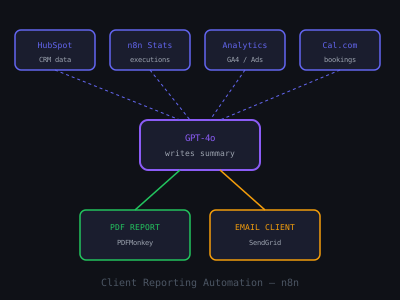
Manual client reporting is one of the biggest time drains for AI agency owners. If you have ten clients and spend 45 minutes manually pulling metrics, writing summaries, and sending reports for each one, you are losing seven and a half hours per week on work that does not require human judgment — it just requires consistency and accuracy.
Automated client reporting solves two problems simultaneously: it gives you that time back for high-value work (selling, building, and improving automations), and it makes your clients feel better cared for. Clients who receive consistent, clear reports churn less. They see the value you are delivering before you even get on a renewal call. This guide covers the complete automated reporting system — what to measure, how to pull the data, how to format it, and how to deliver it automatically every week.
What to Include in AI Automation Client Reports
The most common mistake AI agency owners make with client reports is including metrics that impress technically but mean nothing to the client. Workflow execution counts, API call volumes, and automation uptime statistics are internally useful but client-invisible. Clients care about outcomes that connect to their business.
For most AI automation clients, the five metrics that matter are: leads captured or inquiries responded to (shows volume of work the automation is handling), average response time improvement (before automation vs. current — this is a compelling comparison), appointments booked or qualified leads generated (direct revenue-connected output), no-shows prevented or follow-ups completed (quantifiable ROI), and estimated revenue recovered or protected (the dollar figure that justifies the retainer). Every report should lead with the dollar impact, not the technical activity.
Client Report Metrics That Reduce Churn vs. Vanity Metrics
Building the Data Collection Layer
The first component of automated reporting is collecting the right data from the right sources. For most AI agency client automations, the data lives in three to five places: the client's CRM (HubSpot, Pipedrive, or a Google Sheets-based system), their calling or SMS tool (Twilio, CallRail, or Ring Central), their calendar or booking system (Calendly, Google Calendar, or Acuity), and any custom tracking you have built into their n8n or Make workflows.
In n8n, build a data collection workflow that runs every Sunday night at 11pm. It should pull this week's data from each source using their respective API nodes. For Google Sheets-based tracking: use the Google Sheets node to pull all rows added in the last seven days. For Twilio call data: use the HTTP Request node to call the Twilio API and retrieve call logs for the past seven days. For Calendly bookings: use the Calendly API node or a webhook that has been logging bookings to a running Google Sheet throughout the week.
Aggregate the raw data into a summary Google Sheet that acts as the reporting data layer. This sheet should have one row per week per client with pre-calculated summary metrics: total leads, response time median, appointments booked, no-shows prevented, and estimated revenue impact. This aggregation step separates data collection from report formatting, making both easier to maintain.
Generating the Report with AI
After collecting and aggregating the data, use an OpenAI or Claude node in n8n to generate the plain-English summary section of the report. Pass the week's metrics as context and prompt the AI to write a three to four sentence business summary in a tone appropriate for the client. The prompt should include the client's industry context, their specific automations, and the actual numbers for the week.
Example prompt: "Write a 3-sentence business summary for a dental practice client's weekly automation report. Their missed call AI captured 47 calls this week (up from 38 last week). Of those, 23 booked appointments via the automated scheduler. The average response time was 45 seconds. Write in a professional, positive tone. Focus on business impact, not technical details."
The AI-generated summary gives each report a personalized feel without requiring you to write it manually. Review the output before it goes live — add a human review step to your workflow that sends you a preview via Slack before the report is emailed to the client. This takes 30 seconds and catches any errors.
Report Formatting and Delivery
For report formatting, choose between two approaches based on your client's preference and your technical capabilities. The simpler approach is a formatted HTML email generated by n8n using a custom email template — this requires no PDF generation and lands directly in the client's inbox without attachments to open. The more polished approach is a PDF report generated using n8n's HTML-to-PDF capabilities or an external tool like PDFShift, which allows consistent branded formatting.
Schedule delivery for Monday mornings at 8am in the client's timezone using n8n's Schedule Trigger. Monday morning delivery means the client starts their week seeing the value you delivered last week — timing the report to arrive when they are most receptive to thinking about business results.
Automated Reporting Impact on Client Retention
Scaling Across Multiple Clients
Once the reporting workflow is built for one client, replicating it for additional clients takes 30 to 60 minutes per new client — primarily configuring their specific data sources and report formatting. Use n8n subworkflows to keep the core logic in one place: the main workflow handles scheduling and delivery for each client, and calls a shared subworkflow that handles data collection and report generation. When you improve the report template or add a new metric, you update the subworkflow once and all clients benefit.
For ten clients with weekly reports, the fully automated system runs completely without your involvement after initial setup. You invest one to two hours per new client to configure their data connections, and the system handles the rest indefinitely. Compare this to 45 minutes per client per week of manual reporting — the automation pays for itself in saved time within the first month.
For clients requesting more sophisticated dashboards, consider deploying a Notion or Google Data Studio dashboard alongside the weekly email report. The dashboard gives clients self-serve access to their data between reports and reduces the "how are we doing?" questions that take up account management time. Our SOP guide for AI automation delivery covers how to document your reporting workflows so team members or contractors can take them over as you scale.
Join 215+ AI Agency Owners
Get free access to our all-in-one outreach platform, AI content templates, and a community of builders landing clients in days.