
How to Create SOPs for Delivering AI Automation Projects at Scale
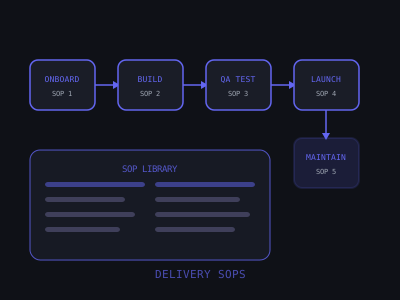
Every time you do the same task from scratch, you're wasting time you already spent. The third time you onboard a client, you should be faster than the first time — not because you're smarter, but because you documented the process the first time and followed it the second.
SOPs (Standard Operating Procedures) are the infrastructure that turns a freelancer into an agency. Without them, every process lives in your head. With them, you can delegate, scale, and take vacations without everything falling apart.
This guide walks through every SOP an AI automation agency needs, with templates and examples you can adapt immediately. Agencies that build this infrastructure early consistently outdeliver those that don't — better client retention, faster delivery cycles, and the ability to bring on contractors or employees without a quality drop.
SOP Priority by Business Impact for AI Agencies
Why SOPs Are the Real Moat
Most agency owners think their competitive advantage is technical skill. It's not. Technical skill is table stakes. Your real moat is a repeatable delivery system that produces consistent outcomes regardless of who executes the work.
Consider two agencies both charging $2,000/month for AI automation retainers. Agency A has no SOPs — the founder handles every client personally, context-switches constantly, and can realistically manage 6–8 clients before quality deteriorates. Agency B has documented SOPs and a part-time VA handling routine tasks — the founder reviews work and handles client calls, comfortably managing 20+ clients at the same quality level.
Same skill level. Agency B earns 2–3x more, works fewer hours, and has a business that doesn't collapse if the founder gets sick for a week.
SOPs are also your fastest path to hiring. With documented processes, a new contractor can be productive within days instead of weeks. You can write a job post that says "follow our documented processes" instead of "must be available to ask me questions constantly."
The SOP Library Structure
Organize your SOPs into five categories that map to the client lifecycle:
- Sales SOPs: Discovery call process, proposal template, contract and onboarding kickoff
- Onboarding SOPs: Client intake, tool access setup, kickoff call, expectation setting
- Build SOPs: Automation build process, integration setup, AI prompt engineering workflow
- Testing and Launch SOPs: QA checklist, client approval process, go-live protocol
- Ongoing SOPs: Monthly maintenance, reporting, issue resolution, renewal conversations
Store all SOPs in a shared documentation tool — Notion is the most common choice for early-stage agencies because of its flexibility and low cost. For a complete Notion workspace setup, see our Notion guide for AI agency owners. Every team member and VA should have access to the full library from day one. Create a master index page that links to every individual SOP so nothing gets buried.
Assign an owner to each SOP — usually the person who does the task most often. That person is responsible for updating the SOP when the process changes. Without ownership, SOPs go stale and stop getting used.
SOP 1: Client Onboarding
A great onboarding SOP ensures every new client gets the same high-quality start, regardless of who handles the process. Onboarding sets the tone for the entire engagement — a chaotic onboarding creates a nervous client who will micromanage you for months.
Trigger: Contract signed and deposit received.
Owner: Account manager or founder (until you hire one).
Target completion time: 5 business days from contract signing.
Steps:
- Step 1 (within 2 hours of payment): Send welcome email with a short Loom welcome video (2 minutes max — introduce yourself, confirm what you're building, and set expectations for the next steps), a link to the kickoff call scheduler, and the onboarding questionnaire.
- Step 2: Create the client folder structure in Notion or ClickUp using the standard template. Folders: Project Brief, Automation Maps, Credentials (shared with LastPass or 1Password, never in plain text), Meeting Notes, Deliverables, Reports.
- Step 3: Send the credentials collection form. Request access to: CRM or lead management platform, phone system (if building SMS/voice automations), website admin or landing page builder, Google Business Profile (if relevant), and any existing automation tools. Use a secure form — never collect passwords via email.
- Step 4: Run kickoff call (60 minutes). Use this agenda: 10 minutes on goals and success metrics, 15 minutes on existing workflows and pain points, 15 minutes confirming scope and what's out of scope, 10 minutes on communication norms and how they prefer updates, 10 minutes on timeline and next steps. Record with permission.
- Step 5 (within 24 hours of kickoff): Send kickoff summary email confirming scope, timeline, first deliverable date, communication channel, and escalation process if something looks wrong post-launch.
- Step 6: Create the automation map document — a visual or table showing every workflow to be built, its trigger, the action sequence, expected output, and the tool stack involved. Share it with the client for confirmation before building begins.
The automation map is frequently skipped and almost always regretted. When you build without one, scope creep is inevitable. "I thought you were also going to build X" is a conversation that costs you hours. The map is your paper trail.
SOP 2: Automation Build Process
Standardizing your build process prevents bugs, missed requirements, and late deliveries. It also makes your work reviewable — a second set of eyes can audit a documented build in 20 minutes; an undocumented build requires 2 hours of reverse-engineering.
Pre-build checklist (complete before writing a single node):
- All access credentials are available, tested, and stored securely
- Automation map is confirmed and signed off by the client
- Third-party dependencies identified: API rate limits, webhook endpoint availability, any paid plan requirements (e.g., Make.com operations limits, Twilio verified numbers)
- Time estimate created and confirmed to be within project scope
- Staging/sandbox environment set up and ready
Build steps:
- Step 1: Build the automation in a sandbox or test environment. For n8n, use a separate workflow tagged "[TEST]". Never build directly in production. This is non-negotiable.
- Step 2: Write the AI prompt in a separate document first. Define the persona, the context it needs, the task, the output format, and constraints (max length, language style, what it should never say). Test the prompt independently with 10 varied inputs before embedding it in the workflow.
- Step 3: Build the trigger and first action node. Confirm it fires correctly with a live test before adding more complexity. Build in layers — verify each layer before stacking the next.
- Step 4: Add error handling at every external API call. What happens if the CRM is unreachable? If the AI response is malformed? If the phone number is invalid? Every external call needs a fallback path — either a retry loop, a human notification, or a graceful failure message.
- Step 5: Document the completed build: trigger source, each node and its function, conditional logic paths, expected output at each stage, and any manual interventions required. Store this in the client folder.
- Step 6: Internal review — have another team member (or your own fresh eyes after 24 hours) audit the build against the automation map. Check that every requirement is covered.
- Step 7: Demo to client using the demo framework. Walk through the exact scenario they care most about first, then show edge cases.
- Step 8: Collect client approval in writing before moving to production. A simple email reply of "approved" is sufficient and protects you.
SOP 3: Prompt Engineering and AI Quality Workflow
This SOP is specific to AI automation work and one most agencies skip entirely. AI response quality is the most common point of failure post-launch — not the workflow logic, not the integrations, but the AI saying something the client didn't expect.
The prompt development process:
- Step 1 — Draft the base prompt. Include: role/persona ("You are a customer service agent for [business name]..."), context (business type, services, location, hours), task (what you're asking it to do), output constraints (format, length, tone), and hard rules ("Never promise a specific price. Never discuss competitors.").
- Step 2 — Adversarial testing. Try to break the prompt. Submit inputs a real user might send that are off-topic, inappropriate, ambiguous, or designed to extract information the AI shouldn't share. Document every failure and patch it.
- Step 3 — Client-specific review. Share 20 sample interactions with the client before launch. Ask them to flag anything they wouldn't want a customer to receive. Iterate until they're comfortable.
- Step 4 — Version control prompts. Store every version of the prompt with a date and changelog note. When something goes wrong post-launch, you can compare against the last known good version.
- Step 5 — Set up monitoring. For high-volume automations, implement a weekly sample review — pull 10–20 random AI-generated responses and check them manually. AI models can drift in quality over time especially if the underlying model gets updated.
Most agencies learn this the hard way: the client calls at 9pm because their AI told a customer something wrong. Having this SOP means you catch problems in testing, not in production.
SOP 4: QA and Testing Checklist
Every automation must pass this QA checklist before launch. No exceptions — not even if the client is impatient, not even if it's 80% tested and "looks fine." The one thing you skip is always the thing that breaks on day one.
- Trigger test: Confirm the automation fires correctly from every trigger source (form submission, inbound SMS, missed call, email, API call, CRM field change). Test each trigger independently.
- Response quality test: Run 10 test scenarios through the AI component. Scenarios should include: typical inquiry, price question, after-hours inquiry, aggressive or rude message, request for something outside the scope of the business, and a booking request. Verify every response is accurate and on-brand.
- Edge case test: What happens when a lead sends only "?" or a string of emojis or a message in a different language? Confirm graceful handling that doesn't break the workflow or produce a jarring response.
- Booking integration test (if applicable): Submit a booking through the automation. Confirm the appointment appears in the calendar with the correct date, time, client name, and any notes. Confirm the confirmation message goes to the client.
- CRM integration test: Submit a test lead. Verify the contact record is created in the CRM with the correct fields populated. Confirm any pipeline stage, tag, or assignment logic is correct.
- Failure handling test: Temporarily break an API connection (use a wrong API key). Confirm the automation fails gracefully — either retrying, notifying the owner, or sending a fallback message instead of silently failing.
- Volume test: Run 20 simultaneous test leads through the workflow. Confirm no rate limiting errors, queue failures, or duplicate records. This catches issues that single tests miss.
- Notification test: Confirm any owner or team alerts fire correctly — new lead notification, high-intent flag, booking alert, or escalation trigger.
- Deduplication test: Submit the same lead twice. Confirm the CRM or workflow handles it as expected (either merges, skips, or flags — whatever the client requires).
Document the QA results in a pass/fail table and store it in the client folder. This becomes your liability protection if anything goes wrong post-launch. When a client claims "this never worked," you have a timestamped QA record showing it was tested and passed.
SOP 5: Go-Live Protocol
Launch day is high stakes — a well-defined protocol prevents mistakes under pressure. Adrenaline causes errors. A checklist doesn't.
- Step 1: Confirm client approval in writing. Email or Slack message explicitly confirming they're ready to go live and have reviewed the demo.
- Step 2: Schedule launch during business hours, mid-week. Never launch on Friday afternoon, the day before a holiday, or outside the client's normal operating hours. If something goes wrong at 4pm Friday, you both have a bad weekend.
- Step 3: Make the production switch. If using n8n, activate the production workflow and deactivate the test version. Update any webhook URLs, phone numbers, or form endpoints from test to production.
- Step 4: Watch logs in real time for the first 30 minutes. Have the client send a live test inquiry. Walk them through the result via a quick Loom video or screen share so they can see it working with their own eyes.
- Step 5: Send go-live confirmation email with: what is now live, how to monitor it (link to the dashboard or monitoring tool), what to do if something looks wrong (direct contact, not a support ticket), and the first scheduled check-in date (48 hours post-launch).
- Step 6: 48-hour check-in. Review the first two days of production logs. Confirm trigger counts match expected traffic. Check AI response samples. Confirm no error spikes. Send the client a brief "all systems green" update with key numbers from the first 48 hours.
The 48-hour check-in is what separates professional agencies from developers who disappear after launch. Clients remember it. It reduces churn and creates upsell conversations naturally — "You got 34 leads in 48 hours and booked 11. Want to add a follow-up sequence for the ones who didn't book?"
SOP 6: Monthly Maintenance and Reporting
Retainer clients expect consistent delivery and visibility into results. This SOP ensures you never miss a reporting cycle and gives you structured touchpoints to identify upsell opportunities every single month.
Weekly (15 minutes per client):
- Check automation logs for errors or anomalies — look for error rate spikes, trigger failures, or API timeouts
- Verify all integrations are still connected and authenticated (OAuth tokens expire; API keys get rotated)
- Spot-check 5 recent AI responses for quality
- Log any issues in the client's maintenance log for the monthly report
Monthly (90 minutes per client):
- Pull performance data for the reporting period: total leads processed, response rate, booking rate, conversion rate, and any client-specific metrics defined at onboarding
- Calculate ROI using the framework from the ROI reporting guide — quantify what the automation did in dollar terms whenever possible
- Identify 1–2 optimization recommendations. These should be specific: "Your booking rate drops sharply for leads that message after 8pm — adding a delayed morning follow-up could recover 15–20% of those" is useful. "Things are going well, no changes needed" is not.
- Write the report using the standard template. Include: summary metrics, month-over-month comparison, top wins, issues resolved, and recommended next steps.
- Send the report and schedule the monthly call. Send it 48 hours before the call so the client has time to review it.
- On the call: 10 minutes on results, 15 minutes on what's working and what isn't, 10 minutes on optimization recommendations and next month's priorities, 5 minutes on any new needs (this is your natural upsell window).
Automate the data collection for the report using n8n or Make — pull metrics from the relevant platforms on a schedule and populate a Google Sheet or Notion database automatically. The SOP then becomes mostly about analysis and client communication rather than manual data gathering. You've already sold AI automation to your clients; use it yourself.
Time Spent Per Client Phase — With vs Without SOPs
How to Write a Good SOP
A SOP that nobody uses is worthless. Most SOPs go unused not because people are lazy, but because they're written in a way that's hard to follow under pressure. Here's what makes SOPs actually get used:
- Write at the reader's level: Assume the person following the SOP is intelligent but unfamiliar with your specific setup. Define acronyms, link to tools, and explain why each step matters — not just what to do.
- Use numbered steps, not paragraphs: Prose is harder to follow when you're executing a task and checking boxes. Number every action. Break complex steps into sub-steps rather than cramming them into a single line.
- Include screenshots or Loom videos: For anything visual — setting up a webhook, navigating a CRM, configuring an n8n node — a Loom recording is 10x faster to follow than written instructions. Embed it directly in the SOP.
- Define every output: Every step should end with a specific, verifiable output. "The client folder is created with all 6 tabs populated" is good. "Set up the folder" is not. If you can't verify it was done, it probably won't be done correctly.
- Include common failure modes: Document what can go wrong and exactly what to do about it. "If the API credentials don't work, check X before doing Y. If still failing, escalate to [name]." This prevents panic and saves hours of debugging.
- Version and date every SOP: SOPs get stale. Add a header with the last reviewed date and reviewer name. Schedule a quarterly review of every SOP in your library. A SOP based on how n8n worked in 2024 might be actively misleading in 2026.
- Keep them short: If an SOP takes more than 10 minutes to read, it's too long. Break long processes into multiple linked SOPs. A library of 20 focused SOPs is more useful than 5 sprawling ones.
The SOP Creation Process: Starting From Zero
Don't try to write your entire SOP library in one sitting. This approach always fails — you either burn out before finishing, or you produce low-quality documentation under pressure that nobody trusts.
Use the "do it, document it" method instead:
- The next time you do any repeatable task, record a Loom video of yourself doing it while narrating out loud what you're doing and why
- After completing the task, turn the Loom into a written SOP using the structure above — numbered steps, outputs defined, common failures noted
- Tag the Loom video in the SOP so anyone who wants to watch it can
- After 30 days of this habit, you'll have a comprehensive SOP library covering every core process, built without a single day dedicated to "writing documentation"
Once your SOPs support delegation, you can sell retainer packages confidently. Our retainer model guide covers how to structure and price ongoing engagements. Prioritize in this order: onboarding SOPs first (they directly affect client experience), QA and launch SOPs second (they directly affect deliverable quality), maintenance SOPs third (they enable delegation), build SOPs last (these are harder to standardize because builds vary more by client).
The goal for your first 90 days is to have SOPs for the five processes covered in this guide. That's enough to hire a part-time VA, maintain consistent delivery across 10+ clients, and stop relying on memory and heroics.
Once your SOPs are in place, use the systems for scaling client work described in how to manage multiple AI automation clients without burnout to take full advantage of the infrastructure you've built.
Frequently Asked Questions
Want to learn how to build and sell AI automations? Join our free community. Join the free AI Automation Sprint community.
Join 215+ AI Agency Owners
Get free access to our all-in-one outreach platform, AI content templates, and a community of builders landing clients in days.