
Best Project Management Tools for AI Automation Agencies in 2026
Managing AI automation projects is different from managing a typical software project or marketing campaign. You are dealing with live integrations that can break, client automations that run 24/7, ongoing maintenance commitments, and monthly deliverables — all simultaneously across multiple clients. The right project management tool reduces the cognitive overhead of running an agency so you can spend more time building and selling. The wrong one creates busywork that competes with client work. Here is a clear-eyed comparison of the tools that actually work for AI automation agencies in 2026.
What AI Automation Agencies Need From a PM Tool
Most AI automation agencies need per-client workspace organization (not just projects but full client contexts), task tracking with priority levels and due dates, a place to store client documentation and SOPs, communication threading either built-in or integrated, time tracking or at minimum effort estimation, and automation support for repeating task templates covering monthly maintenance. Nice-to-haves include CRM integration, invoicing, and proposal building — these matter more as you scale. There is also one need specific to AI automation work that gets ignored in generic PM tool comparisons: credential and integration tracking. Every client you onboard gives you access to their CRM, their email sending tool, their calendar API, their Twilio account. You need a structured place to track which integrations are live, what credentials are associated with each, and who has access.
The Standard Client Workspace Structure
Regardless of which PM tool you choose, every client should get the same internal workspace structure. Inconsistency is what causes things to fall through the cracks when you are managing eight clients simultaneously. The structure that works across Notion, ClickUp, and Monday.com is as follows. Account Overview covers business type, primary contact info, billing amount and dates, and relationship notes. Automation Inventory is a list of every automation deployed with current status (live, paused, in maintenance), the tool it runs on (n8n, Make.com, Zapier), when it was last tested, and a short description. Active Requests Queue tracks work currently in progress or queued with priority and due date. Monthly Performance Log is a running record showing what ran, what broke, what was fixed, and any metrics the client cares about. Issues Log is a chronological record of every integration failure, bug, or client complaint with the date and resolution. Spend 15 minutes at the end of each week updating every client workspace. This catches problems before clients do and gives you the data to write compelling monthly reports without scrambling to remember what happened.
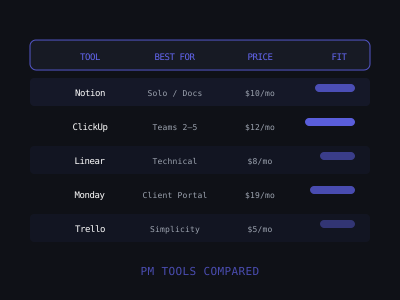
PM Tool Fit Score for AI Automation Agencies (1-100)
Notion: Best for Solo Operators and Documentation-Heavy Teams
Notion is the most flexible tool on this list. You can build almost any workflow you need — client dashboards, SOP libraries, meeting notes, task trackers, and knowledge bases — all in one workspace. Pricing is free for solo use, $10 per user per month on Plus, and $15 per user per month on Business. The ability to build custom client dashboards with embedded databases is powerful for AI agencies. A practical setup: create a top-level Clients database with one row per client, each linking to a dedicated sub-page containing an Automations database with status, tool, and last-tested columns; a task list for active work; and a notes section for call logs. This structure takes about two hours to build once and then 10 minutes per new client to replicate using a template. Notion's SOP library capability is also genuinely useful — when a VA or contractor joins your team, you can point them to a central SOP hub with step-by-step guides for recurring processes.
Where it falls short: task management is clunky compared to dedicated PM tools, there is no built-in time tracking, and it can become a disorganized mess without discipline. Notion's task reminder and due date system is weaker than ClickUp or Monday.com. Best for solo operators handling up to 10 clients who want flexibility over structure.
ClickUp: Best for Growing Agencies
ClickUp is the most feature-rich PM tool in its price range at $7 per user per month on the Unlimited tier and $12 on Business. It has dedicated spaces for clients, multiple view types (list, board, calendar, Gantt), native time tracking, and automation features that reduce repetitive admin work. The specific setup that works for AI agencies: create one Space per client, inside each create two Folders — Active Work and Documentation. Active Work gets standard Lists (Backlog, In Progress, In Review, Done). Documentation gets Automation Specs, Meeting Notes, and Monthly Reports. Use ClickUp's recurring task feature to auto-generate a Monthly Maintenance Check task on the first of every month for every client — this single automation prevents the most common form of client churn. Native time tracking at the Business tier lets you log hours against tasks and pull a client-level time report monthly. If a client is consuming 20+ hours per month on a $1,500 retainer, you need to know that before it becomes a profitability problem. The learning curve is steep, and the feature density can become noise without disciplined configuration. Best for agencies with 2-5 team members handling 10+ clients.
Monday.com: Best for Client-Facing Portals
Monday.com at $12 per user per month on Standard has the best client-facing portal experience of any PM tool. You can give clients view-only access to their project boards, which reduces status inquiry messages significantly. During a sales demo, screen-sharing the Monday.com dashboard you built for an anonymized client shows exactly what prospects will have access to — their automation list, current status of each, active work in progress, and the monthly log. This visual proof of operational discipline closes clients who are hesitant about trusting an unknown agency. The Status column system is clean for automation tracking — each row is a deployed automation, with columns for name, tool, status (Live/Paused/In Maintenance), last tested date, and notes. Clients see this with view-only access without you having to send separate updates. Where it falls short: documentation and wiki capabilities are weak, it gets expensive as team size grows, and per-seat pricing adds up quickly if contractors are involved in delivery.
Linear: Best for Technical Teams
Linear was built for software teams and it shows — if your agency has a development background, Linear's issue tracking, cycle management, and workflow automation will feel natural at $8 per user per month. Treating each client automation as an issue with status tracking and sprint cycles maps well to iterative AI automation delivery. One genuinely useful pattern: create a team per client in Linear, and use Labels to track automation type. When a client reports a bug, create an issue, assign it, and link it to the parent automation. Linear's API also enables an advanced workflow: auto-creating issues from monitoring alerts. If you set up uptime monitoring on your n8n instance, you can pipe failure alerts directly into Linear as high-priority issues — your team sees the problem within seconds without checking a separate monitoring dashboard. Not designed for client-facing use and has no built-in documentation. Best for technical founders who came from a software background and want GitHub-level structure for their agency work.
The Agency Tech Stack by Stage
At the first 5 clients stage as a solo operator, use Notion for client documentation combined with a simple task list. Total cost is $0 to $10 per month. At this stage your PM tool is less important than your processes — a well-maintained Notion workspace beats a neglected ClickUp account. From 5 to 15 clients with a VA, use ClickUp or Monday.com. You need shared task visibility, recurring maintenance templates, and client dashboards your VA can update without asking you for direction. Total cost is $15 to $25 per month. When your first VA is hired, the PM tool becomes a communication layer requiring clear task assignment, priority levels, and status fields — none of which Notion handles well out of the box. At 15+ clients with a small team, use ClickUp Business or Monday.com Pro plus a dedicated documentation tool. You need time tracking, workload management, and team reporting. Total cost is $50 to $100 per month.
Agency Stage vs. PM Tool Investment
The Full Operations Stack Beyond PM Tools
Your PM tool is one layer. The full agency operations stack needs a communication tool (Slack for client channels and internal team, or Loom for async video updates), documentation software (Notion or Confluence for SOP libraries and client onboarding docs), time tracking (Toggl or Harvest to know your actual cost per client), contracts and billing (Dubsado, HoneyBook, or direct Stripe plus DocuSign), password management (1Password Teams — never store credentials in PM tools), and reporting (Databox or a custom Google Data Studio dashboard). Move clients to dedicated Slack channels on day one rather than keeping conversations in email. Slack threads are searchable, keep client contexts separated, and create a natural onboarding reference for new team members. On password management: never store API keys, OAuth tokens, CRM passwords, or any client credentials in your PM tool, in Slack, in Notion, or in a shared Google Sheet. Use 1Password Teams or Bitwarden Business with one vault per client. When a team member leaves, you revoke their access to that vault and rotate the credentials they had access to.
Common Mistakes When Setting Up Agency PM Systems
Overbuilding the system before you have clients is the most common mistake. Spending three days configuring the perfect ClickUp workspace before you have a single paying client is procrastination dressed as productivity. Build a minimal structure, get clients, then refine based on what you actually need. Not standardizing the client workspace template causes information loss at scale — every client workspace should look identical structurally. Using the PM tool as a credential store leads to security incidents; the PM tool is for tracking work, not storing secrets. Not logging automation failures means you lose your troubleshooting reference and your defensible record when a client questions reliability. Switching tools too early costs two to three days of migration work and a period of disorganization. Most PM tool frustration comes from inadequate setup, not from the tool itself — before switching, spend four hours properly configuring your current tool. For a complete operations guide, see our articles on how to create SOPs for AI automation delivery and how to manage multiple AI automation clients without burnout.
Join 215+ AI Agency Owners
Get free access to our all-in-one outreach platform, AI content templates, and a community of builders landing clients in days.