
How to Build an AI Lead Scoring System for Your Clients Using n8n
Most businesses collect leads and treat them all the same. Sales reps waste hours chasing tire-kickers while hot prospects go cold. An AI lead scoring system changes that entirely — routing the best leads to the top of the pile automatically, before a human ever touches the CRM. This is one of the most impactful automations you can build for clients because the ROI is immediate and obvious: more revenue from the same lead volume, with less wasted sales effort.
In this guide you'll learn exactly how to build a fully automated lead scoring workflow in n8n that uses GPT-4 to evaluate each incoming lead against custom criteria, assign a score from 1-100, and push enriched records straight into your client's CRM. This is one of the highest-ROI automations you can sell — and agencies are packaging it as a $1,500-$3,000/month retainer with ease.
Why Lead Scoring Is a High-Value Automation to Sell
Lead scoring is not new, but AI-powered dynamic scoring is. Traditional rule-based scoring (5 points for a job title, 10 for a website visit) is brittle and requires constant maintenance. Every time the market shifts, a new lead source opens, or the client's ICP evolves, the rules need manual updating. AI scoring reads the full context of a lead — their message, company size, industry, pain points, and behavioral signals — and assigns a nuanced score in seconds.
For your clients, the ROI is obvious: sales teams close significantly more deals when they focus on the right leads. The math is compelling in any sales conversation. If a sales rep spends 40 hours a week and 60% of that time goes to leads that were never going to convert, you are recovering 24 hours of productive selling time every week by simply reordering the queue. For you, it's a recurring service that saves your client money every month and is hard to replace once embedded in their workflow.
The stickiness factor cannot be overstated. Once an AI lead scoring system is integrated into a client's CRM and their sales team has adapted their workflow around it, removing the system would mean reverting to manual prioritization — something no sales team wants to do. This creates natural retention that supports long-term retainer relationships.
AI Lead Scoring Impact — Before vs After Implementation
Relative performance index showing typical improvements after implementing AI lead scoring for B2B sales teams.
What You'll Build
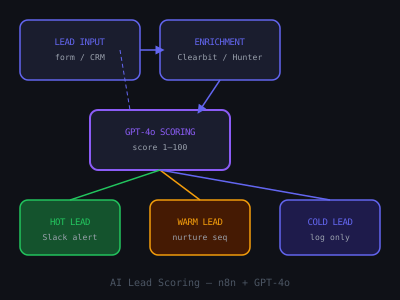
The complete workflow covers five stages, each handling a critical step in the lead evaluation pipeline:
- Lead capture — webhook or form submission triggers the workflow, accepting data from any source
- Data enrichment — pull company and contact data from external sources to fill in firmographic gaps
- AI scoring — GPT-4 evaluates the lead against a custom scoring rubric calibrated to your client's ICP
- CRM update — score, tier, and reasoning pushed to HubSpot, Pipedrive, or Airtable for full auditability
- Routing — high-score leads trigger immediate Slack alerts, sales tasks, or automated email sequences
The beauty of this architecture is its modularity. Each stage operates independently, which means you can upgrade individual components — swap enrichment providers, change the AI model, add new CRM destinations — without rebuilding the entire workflow. This modularity also makes maintenance straightforward, which is important for a service you are selling as an ongoing retainer.
Step 1: Set Up Your n8n Webhook Trigger
Every lead scoring system starts with a trigger. In n8n, add a Webhook node as the first node in your workflow. Set the HTTP method to POST and copy the webhook URL. This URL will receive lead data from whatever source your client uses — Typeform, website contact forms, LinkedIn lead gen forms, or CRM webhooks.
If your client uses HubSpot, add a HubSpot Trigger node instead and set it to fire on "Contact Created" events. For Typeform, use the Typeform Trigger node. The key fields you want captured at this stage:
- Full name and email
- Company name and website
- Job title
- Free-text field (e.g., "What are you looking for?")
- Company size (if collected)
A practical tip: add a Set node immediately after the trigger to normalize the incoming data into a consistent format. Different lead sources send data in different structures — Typeform field names differ from HubSpot property names. The Set node standardizes everything into a clean object with consistent field names before it enters the enrichment and scoring pipeline. This normalization step prevents errors downstream and makes the workflow adaptable to new lead sources without restructuring the entire pipeline.
Step 2: Enrich the Lead Data
Raw form data is rarely enough for accurate scoring. A name and email alone give the AI very little to work with. Add an HTTP Request node to call Clearbit or Hunter.io to pull company data based on the email domain. With Clearbit's enrichment API, you can get employee count, annual revenue, industry, and technology stack — all powerful scoring signals that dramatically improve accuracy.
If budget is a concern, use a free alternative: call the Hunter.io Domain Search API to verify the email domain is legitimate and get company size estimates. Add a Set node to merge the enrichment data with the original form fields into a single clean object before passing it to GPT.
The enrichment step is where many lead scoring systems differentiate between basic and premium implementations. A basic system scores on form data alone. A premium system enriches every lead with firmographic and technographic data before scoring, which dramatically improves accuracy. When selling this service, the enrichment layer is a natural upsell — start with basic scoring and offer enrichment as a premium add-on that increases accuracy and value.
Error handling is critical at this stage. Enrichment APIs are not always reliable — they may return empty results for small companies, timeout under load, or hit rate limits. Add an IF node after each enrichment API call that checks the response status code. If the API returns an error or empty response, route to a fallback branch that continues with raw data only. This prevents the entire workflow from failing when a single enrichment call has an issue.
Step 3: Build the AI Scoring Prompt
This is where the core intelligence lives. Add an OpenAI node (or HTTP Request to the OpenAI API) and configure it with a carefully structured system prompt. The quality of your scoring prompt directly determines the quality of the scores — this is the component that deserves the most iteration and refinement.
Your system prompt should define the Ideal Customer Profile (ICP) for your client. For example, for a B2B SaaS client targeting mid-market companies:
- Industry: SaaS, tech, professional services
- Company size: 50-500 employees
- Decision-maker titles: VP of Operations, CTO, Head of Sales
- Pain indicators: mentions of manual processes, scaling challenges, team productivity
- Disqualifiers: freelancers, students, companies under 10 employees
The user message passes all collected lead data as a JSON block and asks GPT-4 to return a JSON response with four fields:score (integer 1-100), tier ("hot", "warm", or "cold"),reasoning (2-3 sentence explanation), and recommended_action (what the sales team should do next). Set temperature to 0.2 for consistent, deterministic scoring.
The reasoning field is often the most valuable output for your clients. Sales reps do not just see a number — they see why the AI scored the lead this way. "Score: 82. This is a VP of Operations at a 120-person SaaS company that recently raised Series B. Their form message mentions manual reporting taking 15+ hours per week, which is a strong automation signal. Recommended action: schedule same-day call." That level of context makes the score actionable and builds sales team confidence in the system.
Prompt Engineering Best Practices for Lead Scoring
Write your scoring prompt with explicit scoring bands rather than leaving the AI to determine its own scale. Specify what a score of 90+ means (perfect ICP fit with buying intent signals), what 70-89 means (strong fit with some uncertainty), what 40-69 means (partial fit requiring further qualification), and what below 40 means (poor fit or insufficient data). This calibration ensures consistent scoring across different lead profiles and prevents score inflation or deflation over time.
Include negative scoring criteria as well as positive ones. Explicitly tell the AI to deduct points for disqualifying signals: personal email addresses (gmail, yahoo) when targeting enterprise, job titles below decision-maker level, company sizes outside the target range, or industries that are poor fits. Negative criteria prevent the AI from over-scoring leads that have one strong signal but multiple disqualifying attributes.
Step 4: Parse and Route the Score
Add a Code node to parse the JSON response from GPT. Extract the score, tier, reasoning, and recommended action fields. Then add an IF node to branch based on tier:
- Hot (score 75-100) — immediate Slack notification + create sales task in CRM + add to priority outreach queue
- Warm (score 40-74) — add to nurture sequence in email platform + create CRM task for follow-up within 48 hours
- Cold (score 1-39) — log to spreadsheet for monthly review, add to long-term newsletter list, no immediate action
For the Slack notification on hot leads, include the lead name, company, score, reasoning, and recommended action so the sales rep immediately knows why this lead is worth calling now. Format the Slack message with clear visual hierarchy — bold the company name and score, put the reasoning in a separate paragraph, and include a direct link to the CRM record so the rep can take action without searching.
The routing logic is where the business value becomes tangible. Without this system, every lead sits in the same CRM queue waiting for manual review. With it, hot leads trigger instant notifications, warm leads enter automated nurture sequences, and cold leads are filed without consuming sales team bandwidth. The sales team's time is redirected from sorting to selling.
Step 5: Push to CRM
Add a HubSpot node (or Pipedrive, Airtable, or any CRM your client uses) to update the contact record with the AI score and reasoning. Create custom properties in HubSpot: "AI Lead Score" (number field), "AI Scoring Tier" (dropdown: hot/warm/cold), "AI Scoring Reason" (text field), and "AI Score Date" (date field). Map the GPT output to these fields.
This creates a permanent record of why each lead was scored the way it was — which your clients will love because it makes the AI transparent and auditable. Sales managers can review scoring decisions and give you feedback to refine the ICP prompt. The auditability also builds trust in the system — sales teams that can see the reasoning are much more likely to act on the scores than teams that are given opaque numbers without context.
For hot leads, go beyond just updating the contact record. Create a deal in the CRM pipeline automatically, set the deal value based on enrichment data (company size can inform estimated deal size), and assign it to the appropriate sales rep based on territory or round-robin rules. This end-to-end automation means that from the moment a hot lead submits a form to the moment it appears as a deal in a sales rep's pipeline takes seconds, not hours.
Step 6: Add a Feedback Loop
The best lead scoring systems improve over time. Build a simple feedback mechanism: when a sales rep marks a deal as "won" or "lost" in the CRM, trigger an n8n workflow that logs the original AI score alongside the outcome to a Google Sheet. After 30-60 days, review this data to identify patterns — did cold-scored leads ever convert? Did the system miss certain company types? Were there false positives that wasted sales time?
Use these insights to refine the ICP prompt and scoring criteria. This feedback loop is what separates a one-time automation build from an ongoing retainer engagement. Every month, you review the scoring accuracy data with your client, make prompt adjustments, and demonstrate continuous improvement. This regular optimization cadence justifies the monthly retainer and makes your service increasingly valuable over time.
Track key accuracy metrics: what percentage of hot leads actually converted, what percentage of cold leads would have converted if prioritized, and what is the correlation between AI score and actual deal value. These metrics give you concrete data to present in monthly reviews and to use when refining the scoring criteria.
Lead Scoring System — Service Packaging Options
Higher-tier packages generate more recurring revenue and stronger client retention.
How to Price and Sell This as a Service
AI lead scoring delivers ROI that is easy to quantify. If a client closes deals worth $5,000 each and your system helps them identify 5 extra hot leads per month that convert at 20%, that's $5,000 in incremental monthly revenue. Charging $1,500-$2,500/month for setup, maintenance, and prompt refinement is a straightforward value conversation.
Structure your pricing as either a monthly retainer or a hybrid model. The hybrid approach works well: charge a one-time setup fee of $3,000-$5,000 for the initial build, configuration, and testing, then $500-$800/month for ongoing management, prompt refinement, and monthly accuracy reviews. The setup fee covers your initial time investment and the retainer creates predictable recurring revenue.
Target businesses that have a sales team of 3+ people, receive more than 50 leads per month, and currently have no scoring system. B2B SaaS companies, financial services, real estate agencies, and marketing agencies are all strong fits. The qualification question to ask on discovery calls is: "How does your sales team currently decide which leads to call first?" If the answer involves any form of manual review, gut feeling, or first-come-first-served, you have a strong prospect.
For related automation builds, see our guides on building n8n automations for small business clients and the foundational n8n beginners guide if you're just getting started.
Common Mistakes to Avoid
- Vague ICP prompts — GPT needs specific criteria to score accurately. Generic prompts like "score this lead based on how good a fit they are" produce generic, inconsistent scores. Provide explicit criteria, scoring bands, and examples.
- No fallback for enrichment failures — Clearbit and Hunter APIs sometimes return empty responses. Add error handling that scores on raw data alone if enrichment fails, rather than letting the workflow break.
- Ignoring the cold tier — Some cold leads are cold because of timing, not fit. Build a 90-day re-engagement sequence for cold leads that re-scores them after new activity or engagement signals.
- Static prompts — Review and update the ICP prompt every 60 days based on actual conversion data. Markets evolve, and your scoring criteria should evolve with them.
- Overselling accuracy — Set realistic expectations with clients. AI scoring is not perfect — it is better than manual scoring and improves over time. Frame accuracy as a metric you actively track and improve, not a guarantee.
Advanced: Behavioral Lead Scoring
Beyond firmographic data, add behavioral signals to your scoring model for even higher accuracy:
- Email engagement: Track opens and clicks from your outreach sequences. Leads who open 3+ emails score higher because engagement indicates interest.
- Website visits: If the client uses HubSpot tracking, factor in page views. Pricing page visits are a strong buying signal.
- Content downloads: Leads who download case studies or whitepapers show higher intent than general website visitors.
- Form completion: Leads who fill out detailed forms with optional fields demonstrate more serious interest.
- Social engagement: LinkedIn profile views or connection requests from the lead indicate active interest.
Combine firmographic and behavioral scores in a weighted formula. A common split is 60% firmographic fit and 40% behavioral engagement. Re-score leads weekly as new behavioral data comes in, and promote leads from cold to warm when their engagement score crosses a threshold. This dynamic re-scoring creates a system that captures leads who were initially cold but have since shown buying signals — prospects that a static scoring system would miss entirely.
Building a Lead Scoring Dashboard
Give your clients visibility into the scoring system with a simple dashboard that demonstrates ongoing value:
- Daily digest: Send a Slack or email summary each morning showing new leads scored in the last 24 hours, broken down by tier.
- Weekly report: Use a Google Sheets node to aggregate weekly stats: total leads scored, distribution by tier, average score, and top companies.
- Scoring accuracy tracker: Plot AI scores against conversion outcomes over time. Share this monthly to demonstrate system value and justify the retainer.
- ROI calculator: Track the number of hot leads surfaced, deals closed from hot leads, and revenue attributed to AI-prioritized leads. This is the metric that makes retainer renewal conversations effortless.
This reporting layer is what transforms a one-time build into a sticky monthly service. Clients who see regular, quantified results from your system rarely cancel. The dashboard also serves as a sales tool for acquiring new clients — showing a live example of the reporting a new client would receive makes the service tangible and compelling.
Tools and Stack Summary
- n8n — workflow automation platform (self-hosted or cloud)
- OpenAI GPT-4o — lead scoring and reasoning
- Clearbit or Hunter.io — contact and company enrichment
- HubSpot / Pipedrive / Airtable — CRM destination
- Slack — real-time alerts for hot leads
- Google Sheets — feedback loop logging and reporting
Building this system from scratch takes 4-6 hours for an experienced n8n developer. Once built, it runs indefinitely with minimal maintenance — making it one of the best productized services you can offer as an AI automation agency. The ongoing retainer work (prompt refinement, accuracy reviews, enrichment management) requires 2-3 hours per month per client, creating excellent margins on the $1,500-$2,500 monthly retainer.
Get the Free Template
The complete n8n workflow template for this build is available for free inside our community. Download it and have this running for a client in under an hour.
Join the free AI Automation Sprint community to access all templates.
Frequently Asked Questions
Want to learn how to build and sell AI automations? Join our free community. Join the free AI Automation Sprint community.
Join 215+ AI Agency Owners
Get free access to our all-in-one outreach platform, AI content templates, and a community of builders landing clients in days.