
How Many Cold Emails Should You Send Per Day to Avoid Getting Flagged?
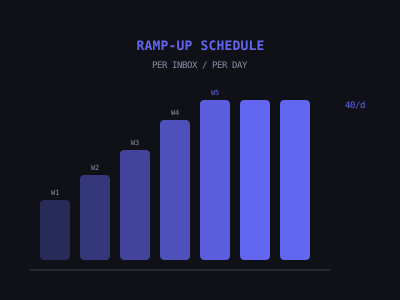
For a single well-warmed mailbox with three or more weeks of warm-up completed, the safe maximum is 30 to 40 cold emails per day. Brand new mailboxes should start at five to ten per day and ramp up by five to ten per week. To send more total volume, add more inboxes using inbox rotation rather than pushing any single inbox past 40 per day.
Getting this wrong is expensive. Send too much and you burn your domain permanently. Send too little and your pipeline never builds. This guide gives you the exact numbers, ramp-up schedules, rotation strategies, and warning signals so you never have to guess. For the warm-up process itself, see our complete 30-day warm-up protocol.
The Per-Inbox Limits That Keep You Safe
New mailbox, days one to fourteen: zero cold emails during warm-up only. Days fifteen to twenty-eight: five to ten cold emails per day alongside warm-up. Days twenty-nine to forty-two: ten to twenty cold emails per day. Day forty-three and beyond: 30 to 40 cold emails per day, which is where you stabilize.
The absolute maximum anyone should send from a single mailbox is 50 per day — and most deliverability experts recommend staying at 40 or below as your steady-state ceiling. Pushing beyond this threshold, even with perfect warm-up and list quality, creates unnecessary risk. The marginal gain from 50 versus 40 emails per day is ten more outreach attempts. The risk of pushing a mailbox into throttling territory and losing it for two weeks of recovery is 560 fewer emails sent. The math favors caution.
Cold Email Volume Guide Per Mailbox
Inbox Rotation: How to Scale Volume Without Burning Domains
Inbox rotation is the technique of distributing your total sending volume across multiple mailboxes so no single inbox exceeds its safe sending limit. Your sending tool — Instantly, Smartlead, Lemlist — automatically cycles through your inbox pool when sending a campaign. You set up the campaign once, and the tool handles the distribution.
The math for scaling with rotation: if each mailbox safely sends 30 cold emails per day, and you want to send 300 cold emails per day, you need ten mailboxes. At two mailboxes per domain maximum (to isolate domain-level reputation risk), that is five domains. Total infrastructure cost: five domains at $12 per year each ($60/year) plus ten Google Workspace accounts at $6 per month each ($60/month) plus a sending tool ($30 to $50/month). Approximately $100 to $130 per month to run 300 emails per day safely.
The staggered launch method makes this even safer: instead of setting up all ten inboxes at once, set up two inboxes per week. By week five, you have ten inboxes all at different stages of warm-up, meaning you always have some fully warmed inboxes in steady-state and some newer ones ramping up. If one inbox gets throttled, you have nine others continuing the campaign.
What "Getting Flagged" Actually Means
When people talk about getting "flagged" by spam filters, they mean several different things, each with different consequences. Soft landing in spam or promotions is the mildest outcome — your emails are delivered but not to the primary inbox. This is often invisible in your open rate tracking if you are not running inbox placement tests. Open rates will decline gradually as more emails land off-primary-inbox. Temporary throttling means the ESP has detected unusual activity and has limited your send rate — you can still send but at a fraction of normal capacity. This typically lasts three to fourteen days.
Domain blacklisting is the most serious outcome — your domain appears on one or more email blacklists (Spamhaus, Barracuda, SORBS) and your emails are actively rejected by receiving servers. Recovery from blacklisting can take weeks and sometimes fails entirely. Account suspension is the permanent outcome — Google or Microsoft suspends your Workspace account entirely, and you lose the mailbox and its warm-up history permanently. This happens rarely but cannot be recovered from.
Sending Schedule Optimization
Beyond volume, the timing of your sends affects both deliverability and reply rates. For B2B cold email, the highest-performing sending windows are Tuesday through Thursday between 7 and 9am in the recipient's local timezone for initial emails. Monday mornings are chaotic for most business owners and Friday afternoons see low engagement. Avoid weekends entirely.
For follow-up emails (emails two, three, and four in your sequence), vary the timing relative to the initial email. If Email 1 went out Tuesday morning, Email 2 should go out Thursday morning. Email 3 should go out the following Monday morning. Email 4 (the breakup) should go out the following Wednesday. Varying the days and times prevents the follow-up emails from arriving in a predictable pattern that screams automation.
Reply Rate by Send Time (B2B Cold Email)
List Quality Is the Multiplier on All of This
Every limit and guideline in this article assumes your list quality is high — verified emails, correct targeting, relevant industry. A poor-quality list creates problems that volume limits alone cannot prevent. If 15% of your list has invalid email addresses, your bounce rate will be 15%, which is catastrophic for domain reputation regardless of how conservatively you are sending.
Verify every email list through NeverBounce or ZeroBounce before loading it into your sending tool. For lists built from LinkedIn scraping or manual prospecting, expect a 5 to 10% invalid rate before verification and a 1 to 2% invalid rate after. For purchased lists or old data, expect 15 to 30% invalid before verification. Never skip verification — a $30 verification bill on a 5,000-contact list is cheap compared to the cost of a burned domain.
For the complete cold email infrastructure setup — from domain purchase through DNS configuration and list building — see our cold email infrastructure guide.
Join 215+ AI Agency Owners
Get free access to our all-in-one outreach platform, AI content templates, and a community of builders landing clients in days.