
Do You Need to Know How to Code to Start an AI Automation Agency?
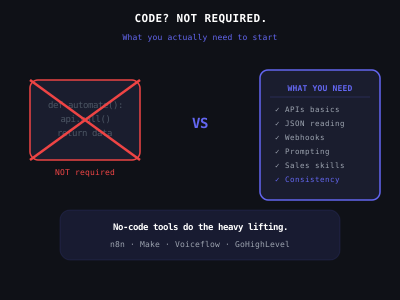
The most common question from people considering starting an AI automation agency is some version of: "But I don't know how to code — can I actually do this?" It's a fair question, and the answer is more nuanced than most content online suggests. So let's settle it definitively.
The short answer: No, you do not need to know how to code to start or run a successful AI automation agency. Many of the most successful agency owners have no programming background whatsoever. However, there are specific technical skills you do need, and confusing "no coding required" with "no technical skills required" is a mistake that trips up a lot of beginners.
What "Coding" Actually Means in This Context
When most people ask if they need to code, they're asking: "Do I need to write programs in Python, JavaScript, or similar languages?" The answer to that specific question is: almost certainly no, for the vast majority of client work you'll do in the first one to two years.
The primary tools used in AI automation agencies — n8n, Make, Voiceflow, GoHighLevel — are visual, drag-and-drop platforms designed specifically for non-programmers. You build workflows by connecting blocks and filling in forms. There's no terminal, no command line, no writing functions. It's much closer to building a flowchart than writing software.
The confusion comes because these tools look technical if you've never seen them, and the underlying concepts (triggers, conditions, API calls, data mapping) are genuinely unfamiliar to most people at first. But unfamiliar is not the same as requiring a computer science degree.
To put this in perspective, consider what "coding" actually involves at a professional level: managing version control systems, writing unit tests, handling dependency management, debugging memory leaks, optimizing database queries, deploying to production servers. None of that is part of your day-to-day as an AI automation agency owner. What you do is closer to configuring software than building it from scratch. You are assembling pre-built components, mapping data between them, and writing natural language prompts. If you can use a spreadsheet competently, you can learn the tools needed to run an AI automation agency.
No-Code Platform Capabilities for Common Agency Services
What Technical Skills You DO Need
While coding isn't required, you do need to develop specific technical competencies. Here's an honest breakdown:
1. Understanding of APIs and Data Flow
APIs (Application Programming Interfaces) are how software applications talk to each other. In automation, you constantly connect apps via their APIs — connecting a contact form to a CRM, or connecting a calendar to an SMS tool. You don't need to build APIs, but you need to understand that they exist, what they do, and how to use pre-built API connectors within n8n or Make.
This is absolutely learnable in a few weeks of practice, even for complete beginners. The concept is simpler than it sounds: you're essentially telling App A to send information to App B when something happens.
Here is a concrete example of how this works in practice. A dental practice wants new patient inquiries from their website form to automatically appear in their CRM and trigger a confirmation text message. The data flow looks like this: form submission fires a webhook to n8n, n8n receives the patient's name, phone number, and message, then n8n sends that data to the CRM via its API (creating a new contact), and simultaneously sends an SMS via Twilio's API using the phone number from the form. You never write a single line of code to make this happen. You drag a webhook trigger node onto the canvas, connect it to a CRM node, fill in the field mappings (form field "phone" goes to CRM field "mobile_phone"), and connect a Twilio node with the message template. The entire build takes 15 to 20 minutes once you know the tool.
2. JSON Basics
JSON (JavaScript Object Notation) is a data format that nearly every modern app uses to pass information between systems. In automation tools, you'll frequently see JSON when looking at the data flowing between steps in a workflow. You don't need to write JSON from scratch, but you do need to be able to read it and understand how to reference specific fields within it.
A JSON object looks like this: {"name": "John", "email": "john@example.com"}. Understanding that "name" and "email" are fields you can reference in your automation is the entire skill you need. Again, completely learnable in a few hours of practice.
Where JSON trips up beginners is nested data — when an API returns something like {"contact": {"details": {"phone": "555-1234"}}}. In that case, you reference the phone number as contact.details.phone. Both n8n and Make have visual data browsers that let you click on the field you want rather than manually typing out the path. So even nested JSON becomes a point-and-click operation. The key mental model is that JSON is just structured data organized into labeled boxes inside other labeled boxes. If you can navigate a file folder system on your computer, you can navigate JSON.
3. Understanding Webhooks
A webhook is simply a way for one app to notify another app that something happened — in real time, automatically. When a form is submitted, the form tool "webhooks" the data to your automation tool. When a payment is processed, Stripe can webhook the data to your workflow. You'll use webhooks constantly.
Using webhooks doesn't require coding. Most tools have a built-in webhook URL you just copy and paste. Understanding what a webhook is and what it does is the only skill required.
To make this tangible: when you create a webhook trigger in n8n, the tool generates a unique URL like https://your-n8n.com/webhook/abc123. You copy that URL and paste it into the settings of whatever tool should send data to your workflow — a form builder, a payment processor, a scheduling tool. From that moment on, every time an event happens in the source tool, the data automatically arrives in your n8n workflow. The entire setup is two copy-paste operations. No authentication headers, no request formatting, no code. The source tool handles sending the data, and n8n handles receiving it.
4. Basic Prompt Engineering
Since you'll be using AI models (usually GPT-4 or similar) within your automations, you need to be able to write effective prompts. This is less a technical skill and more a writing skill — you're crafting instructions for an AI. Getting better at prompting is a real skill that takes practice, but it has nothing to do with programming.
The difference between a mediocre automation and a great one often comes down to prompt quality. Consider a lead qualification workflow where incoming emails are classified by an AI. A weak prompt might say: "Classify this email as hot, warm, or cold." A production-quality prompt specifies the exact criteria: "You are a lead qualification assistant for a roofing company. Classify this inquiry based on the following rules. HOT: mentions a specific timeline (within 30 days), references a budget, or mentions insurance claim. WARM: asks about pricing or process but no timeline. COLD: general inquiry, just browsing, or clearly not a homeowner. Respond with only the classification label and a one-sentence reason." That second prompt reliably produces useful output. Writing prompts like that is a skill you build by testing, iterating, and refining — not by learning to code.
A practical tip: keep a prompt library. Every time you write a prompt that works well for a client project, save it in a document organized by use case — lead classification, appointment confirmation, FAQ response, review request, and so on. Within a few months, you will have a reusable library that dramatically speeds up delivery for new clients. This is one of the most valuable intellectual assets your agency will own.
5. Troubleshooting Mindset
When automations break — and they do break sometimes — you need to be able to diagnose and fix them. This means reading error messages, tracing which step in a workflow failed, and identifying whether the problem is a configuration issue, a missing field, or a connection problem. This is a logical problem-solving skill, not a coding skill. But it does require patience and methodical thinking.
Here is a systematic troubleshooting framework you can use for any failed automation. First, identify the failing node — both n8n and Make highlight exactly which step in a workflow errored, usually with a red indicator. Second, read the error message. Most errors fall into five categories: authentication expired (re-authorize the connection), missing required field (a field the destination app requires was left empty), rate limit exceeded (you hit the API too many times too fast), invalid data type (you sent text where a number was expected), and timeout (the external service took too long to respond). Third, check the input data flowing into the failed node — is everything present and formatted correctly? Fourth, test the failing node in isolation by manually triggering it with known-good data. Fifth, if you still cannot figure it out, copy the exact error message into ChatGPT or Claude and ask for an explanation. AI assistants are exceptionally good at explaining automation error messages in plain language. This five-step process resolves over 90 percent of automation failures without any coding whatsoever.
The Tools That Make Coding Unnecessary
Here's why coding has become genuinely optional in 2026, where it wasn't in 2020:
- n8n has 400+ pre-built integrations covering almost every business tool a small business uses. The AI nodes built into n8n let you incorporate GPT-4 responses into workflows with zero code.
- Make (Integromat) has an extremely visual interface with drag-and-drop logic, filters, and data transformation without code.
- Voiceflow lets you build conversational AI agents with a visual canvas, no code required.
- GoHighLevel has built-in automation features, a CRM, calendar, and communication tools all in one platform — and has become a complete no-code solution for many agency use cases.
- ChatGPT and Claude can write the occasional code snippet you need when you hit a limitation. Even if you can't write JavaScript, asking an AI tool to write 10 lines of JavaScript for a specific transformation is a completely viable approach.
The practical implication of this tool ecosystem is that you can build nearly every automation a small-to-medium business needs without touching code. The ten most common automations agencies sell — missed call text-back, lead follow-up sequences, appointment reminders, review request campaigns, AI chatbots, email classification, CRM data entry, social media posting, invoice follow-ups, and customer onboarding workflows — are all buildable entirely within no-code platforms. These ten services cover roughly 80 percent of the revenue most agencies generate in their first year.
When Coding Does Help
To be fully honest: there are situations where basic coding skills provide a real advantage.
- Complex data transformations: When you need to process large batches of data or do non-standard manipulations, a few lines of JavaScript in n8n's Code node is much faster than building it with visual nodes.
- Custom integrations: When a client uses a tool that doesn't have a native integration, you sometimes need to make raw HTTP API calls. This is easier if you understand how APIs work at a code level.
- Scaling to enterprise: As client complexity grows, custom-coded components become more relevant. This is a Year 2+ concern.
None of these situations require becoming a software developer. They require the ability to read, understand, and modify code — which is a much lower bar. And even this level can be largely circumvented by using AI coding assistants or hiring a part-time developer for specific tasks.
Here is a real-world example of how non-technical agency owners handle the rare situation that requires code. A client needed incoming leads from a custom-built web application that had no native integration with n8n or Make. The agency owner opened ChatGPT, typed "Write me an n8n Code node in JavaScript that takes a JSON payload with fields first_name, last_name, email, and phone, combines first_name and last_name into a full_name field, validates the email format, and outputs the cleaned data," and received working code in 15 seconds. The agency owner pasted it into the Code node, tested it, confirmed it worked, and moved on. Total time spent: under five minutes. Total coding knowledge required: the ability to read the output and understand roughly what it does. You do not need to write code from scratch when AI tools can generate it for you on demand.
Project Complexity Tiers for AI Automation Agencies
The No-Code vs. Low-Code Decision Framework
A useful way to think about your technical approach is to categorize projects by complexity tier before you start building.
Tier 1 — Pure no-code (80 percent of client projects): These are standard automations using native integrations. Missed call text-back, lead follow-up, appointment reminders, review requests, CRM syncing, email classification. Build entirely in n8n or Make using drag-and-drop nodes. Delivery time: 2 to 8 hours per automation. No code needed whatsoever.
Tier 2 — No-code with AI-assisted snippets (15 percent of projects): These involve a non-standard data transformation, a custom webhook payload format, or a minor integration gap. You build 95 percent of the workflow visually, then use ChatGPT or Claude to generate a small Code node for the tricky part. Delivery time: 4 to 16 hours. Coding knowledge needed: ability to paste, test, and lightly modify AI-generated code.
Tier 3 — Custom development (5 percent of projects): These are enterprise-level integrations, custom dashboards, or proprietary algorithm implementations. Either learn enough code to handle these over time, hire a developer on a per-project basis, or simply decline these projects in your first year and focus on Tier 1 and 2 work where margins are excellent and delivery is fast.
Most agency owners who earn $10,000 to $30,000 per month operate almost exclusively in Tier 1 and Tier 2. You do not need Tier 3 capabilities to build a highly profitable business.
Real Non-Technical Agency Owners Who Are Succeeding
The AI automation agency space is full of success stories from non-technical people. Former teachers who built school administration automation for education clients. Nurses who built patient communication automations for healthcare practices. Real estate agents who built lead follow-up systems for property companies. Marketing managers who built campaign automation for their former employers and then turned it into a client service.
In almost every case, the non-technical background was actually an advantage, not a disadvantage. These agency owners deeply understood their target client's world, spoke their language, and could explain the value of automation in terms that mattered to the business.
Technical people sometimes struggle with AI automation sales precisely because they explain their work in technical terms that don't land with non-technical business owners. A former dental office manager selling to dental practices understands the problem better than most developers ever will.
Consider the sales conversation difference. A technical founder might say: "We built an n8n workflow that triggers on a webhook from your form provider, passes the payload through an OpenAI API call for intent classification, and routes qualified leads to your CRM via their REST API." A non-technical founder who used to work in the dental industry would say: "When a new patient fills out your website form, our system instantly texts them a confirmation, adds them to your patient management software, and flags the high-value cases like implants and cosmetic work so your front desk can call them within five minutes." The second version is objectively better at closing deals. The client does not care about webhooks, APIs, or OpenAI. They care about new patients getting called back fast and high-revenue cases not falling through the cracks.
A Practical Learning Path for Non-Technical Beginners
If you're starting from zero technical knowledge, here is a practical 30-day learning plan:
- Week 1: Complete n8n's free beginner tutorials. Build 3 practice workflows using their public templates. Goal: understand triggers, actions, and basic data passing.
- Week 2: Set up a Make account and rebuild your n8n workflows in Make. Compare the two tools. Build a webhook-triggered workflow that sends an SMS via Twilio when a form is submitted.
- Week 3: Add an AI component. Build a workflow where incoming email is sent to GPT-4 for classification, and routed based on the classification. Learn basic prompting.
- Week 4: Build your first demo for a specific industry. For example: a missed-call text-back for a dental practice. Make it polished enough to show a prospect.
Here are some additional details to make each week maximally productive. During Week 1, focus on building these three specific workflows: a Google Sheets row trigger that sends a Slack notification, a scheduled trigger that pulls data from an RSS feed and posts it to a channel, and a manual trigger that takes an input and writes it to a Google Doc. These three workflows teach you the three most common trigger types (event-based, scheduled, and manual) and the core concept of data passing between nodes. Spend at least two hours per day, and resist the temptation to jump ahead.
During Week 2, building the same workflows in Make serves two purposes. First, it reinforces the concepts because you are applying them in a different interface. Second, it gives you flexibility to choose the best tool for each client project. Some clients prefer Make because of its simpler interface for monitoring. Others benefit from n8n's more powerful logic capabilities. Being proficient in both tools doubles your delivery options.
During Week 3, the AI component is where most of the magic happens for clients. When you build the email classification workflow, test your prompt with at least 20 sample emails across different categories. Measure your classification accuracy. Aim for 90 percent or higher before considering the prompt ready for production. This exercise teaches you the iterative nature of prompt engineering in a practical context.
During Week 4, the demo you build should look and feel like a real product. Use a realistic business name, realistic data, and walk through the workflow as if you were presenting it to a prospect. Record a Loom video of yourself demonstrating the automation. This demo video becomes your first sales asset — you can send it to prospects in cold outreach or show it during discovery calls.
By the end of 30 days of deliberate practice, you'll have the technical skills needed to build and deliver the core services most AI automation agency clients pay for.
For a full breakdown of what it takes to deliver client projects, see our guide on how to deliver AI automation without coding. And if you're ready to start your agency, our post on how to start an AI automation agency in 2026 covers everything from niche selection to landing your first client.
If you want to see what skills are most valuable for agency owners, check out our guide on what skills you need to start an AI automation agency. For a hands-on walkthrough of building your first automation, see our beginner's guide to building an AI agent with n8n. And for a platform comparison to help you choose your tools, read n8n vs Make vs Zapier for AI agents.
The Real Barrier Isn't Technical
After working with hundreds of agency owners, the pattern is clear: the people who fail to build their AI agency don't fail because they can't code. They fail because they don't sell consistently, they choose a niche that's too broad, or they give up too early in the client acquisition phase.
Technical skill is learnable in weeks. Sales consistency, niche focus, and persistence over months are harder habits to build — and they matter far more to your outcome.
The numbers back this up. The median time to first paid client for agency owners who do outreach daily is four to six weeks. The median time for agency owners who spend most of their time "learning tools" instead of selling is three to six months, and many never close at all. The difference is not skill level — it is the allocation of time between building and selling. The most successful non-technical founders follow a 30/70 rule in their first 90 days: 30 percent of time learning and building, 70 percent of time on outreach and sales conversations. They learn just enough to be dangerous, close a client, then learn more as the project demands it.
If you're waiting to start until you learn to code, stop waiting. Start building in n8n today, start selling next week, and learn the technical skills as you go. That's the path most successful non-technical agency owners followed.
Frequently Asked Questions
Want to learn how to build and sell AI automations? Join our free community. Join the free AI Automation Sprint community.
Join 215+ AI Agency Owners
Get free access to our all-in-one outreach platform, AI content templates, and a community of builders landing clients in days.